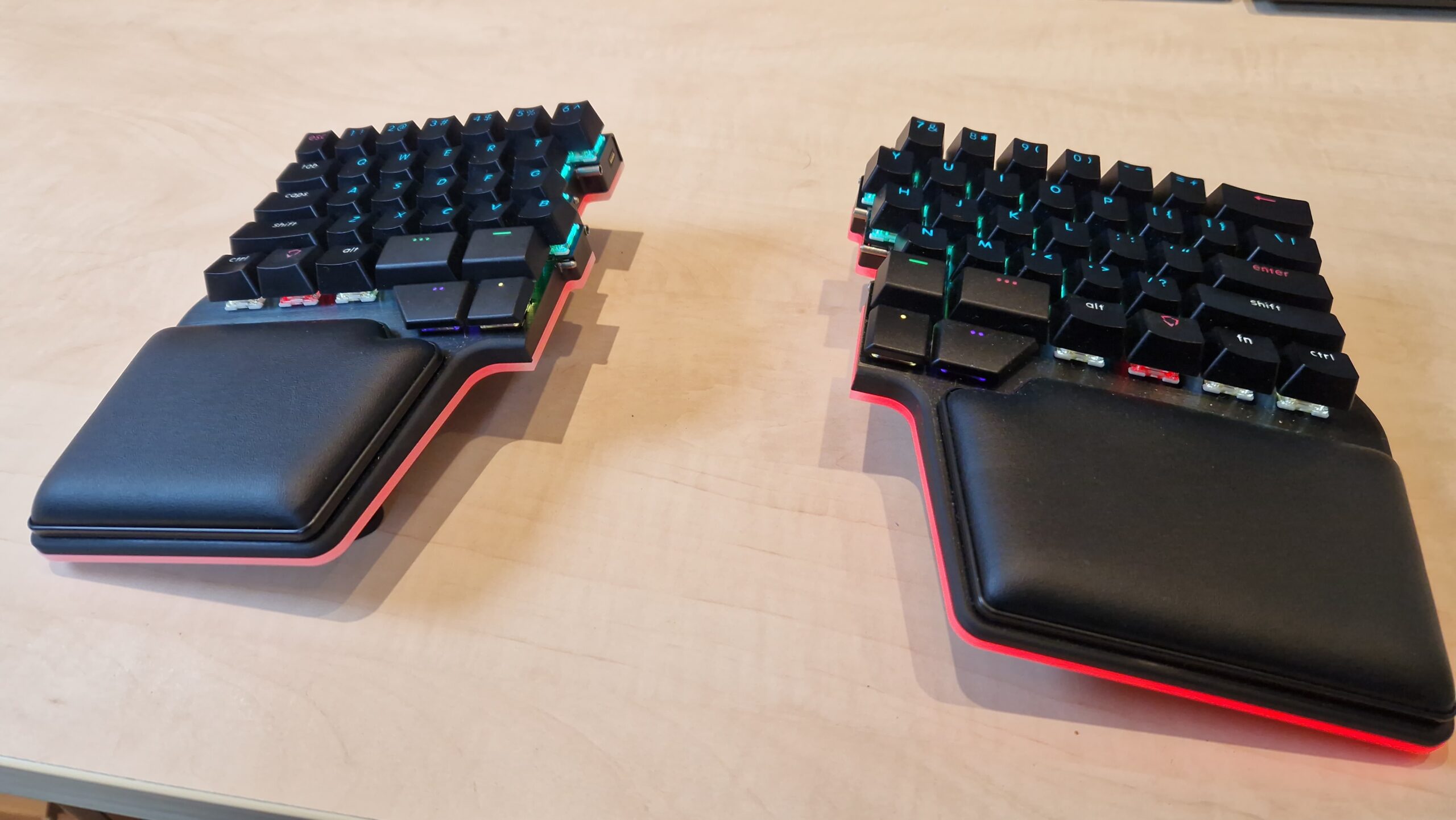
Back in November of 2025, I bought a Dygma Raise 2 split keyboard. I had been thinking about buying some kind of split keyboard for some time, but never bought one for several reasons: first of all, my Das 4 mechanical keyboard was (and is) still going strong. Second, they tend to be pretty expensive, and, third, I was a bit hesitant because most have fewer keys than a regular full-sized keyboard and/or have keys in different places, all of which require me to relearn my typing habits.
I started looking into it again in late 2025, when I was looking for a birthday present. I came across Dygma, a Spanish company, that offered two types of highly customisable keyboards, the Defy and the Raise 2. The latter seemed most attractive because it didn’t have a columnar layout, so I expected the learning curve to be less steep. After some more research I ended up buying one, with the wireless option, the tenting option and underglow. Basically the full package.
Fast forward to yesterday, when a colleague asked me about it. She was interested in getting one because she likes having her mouse right in front of her and currently has it on a lower level of the desk she uses. I started writing some pros and cons, but the text grew larger and larger, so I decided to reproduce it here, where it can maybe be of use to more people.
I have been using it since November 2025 as my daily keyboard. A summary of my experience so far:
- You really have to put the mouse between the two halves. I first had it to the right of the keyboard, with the two halves at shoulder width, but in that case, reaching the mouse (a trackball in my case) meant overextending the lower arm to the right. This soon led to pain in the upper arm and elbow. Like you said: it turns out to be quite comfortable to have the mouse in between the halves.
- Knowing how to touch type properly will be very helpful. I apparently needed to relearn some keys because initially, when I tried to hit an h or y I used my left hand. Which meant my finger hit “air”.
- Be aware of the way the keys are laid out: some keyboards have them “the regular way”, i.e. the rows are slightly shifted horizontally compared to each other. As a result, the
qis not right above thea(on a US layout), but slightly to the right of it. The alternative is a column layout where each row is straight above the other, i.e. the columns of keys are straight (but the rows may be misaligned). See for example the Dygma Defy keyboard. I was too afraid I’d have to relearn how to type to by a keyboard with a columnar layout. - Most split keyboards are “reduced” in the sense that they don’t have F-keys, nor arrows/pgUp/pgDn/home keys. Note that on my keyboard, the
`and~are missing too (the missing backtick is frustrating when writing markdown). Instead they tend to use layers that can be accessed via a modifier key (usually near the thumbs). Do not underestimate the effort to relearn your habits. An example: I was already quite comfortable with the Emacs movement shortcuts (C-pfor up,C-ffor right, etc.) and have configured LibreOffice and Firefox to also implement those as much as possible). This means that I often don’t need to go into the 2nd layer where my arrows and PgUp/Dn live. However… GitLab, for example usesC-b(back; right arrow) to insert two sets of**for bold and I can’t seem to disable that. I very often still need to look at my keyboard to make sure I get the arrow keys right. Org mode shortcuts likeM-S-arrowup to move a heading up become more involved because it’s not only Alt and Shift, but now also the modifier key for the arrows. I guess this last one is mostly a problem for Emacs users. Not that many other computer tools have shortcuts with that many keys. On the other hand, my 3rd layer contains the media playback keys and for some reason those became ingrained in my spine very easily. - If you decide on a keyboard with layers, I like it that mine also has LEDs in the keys so you get a visual confirmation of the layer you are in.
- My keyboard also has a “tenting” option that allows you to angle the halves upwards (so that your palms are pointing a bit more towards each other). I find a 10° angle to be comfortable. However, I don’t think this a strict requirement. It’s a nice to have.
- For a keyboard with layers, the configuration software is very important. Dygma’s Bazecor tool is solid. It works under Linux without any issues, gets regular updates, can flash the keyboard’s firmware and is easy to use for defining the layers. To get an idea of the options, you can download it and configure a virtual keyboard.
- Mechanically, it is a great keyboard. No complaints. Sturdy, pleasant keys, similar to my previous regular mechanical keyboard.
- Mine also has the option for wireless usage, but I tend not to use that. For one, you have to remember to recharge it, but more importantly, it takes a bit longer to wake up (it goes to sleep after x minutes of not using it to save battery life) and I found that to be annoying.
- The built-in palm rests are great. Very comfortable.
- Dygma has a 30-day return policy, which is nice, but seems too short to get used to a keyboard and make a proper decision.
Am I happy with it?
Yes, I’m happy with it, but I’m still missing my separate arrow keys. I (think that I) am as fast as I was before with regular typing, but having to use the 2nd layer for arrows and PgUp/PgDn hasn’t fully settled in yet (actually, maybe that is because I can get away with the Emacs movement keys in most cases).
For these last blocks of text I took my previous Das 4 out of storage again to see if I can still go back to it, and to do a proper comparison with the Dygma. And, yes, that works fine. I notice the typing is a bit less comfortable (in terms of positioning my hands), and the keys seem closer to each other, a bit more crowded. Oh, my wrong hand just typed the h. But moving my right hand to and from the arrow keys is as natural and fast as it was before. I guess that part of the discomfort there comes from the fact that regular arrow (and number pad keys) are in a columnar arrangement, whereas on the Dygma Raise their function is taken over by the regular keys ( e.g. the arrows are [, ], \ and +/= on the right side and, additionally, by s, d, f and e on the left side), which are staggered. Similarly, I can still easily type on my laptop keyboard (although I then miss some of the thumb keys of the Raise 2).
Is it worth the price?
Not sure. It was very, very expensive for a keyboard (around €600 with all the options). I bought it as a company expense, so I saved on taxes, but I don’t think I could have justified the expense if I had to pay it from my regular income/salary. I already thought my previous one (a Das 4) was expensive (IIRC just above €200), but that was a good investment compared to its Logitech predecessor (which wasn’t a mechanical keyboard). I did need a separate palm/wrist pad for it.
Would I buy it again?
Probably. The split design feels more comfortable on the shoulders and the tenting option is another bit of comfort. The layered approach is powerful (maybe I’ll need to spend a bit more time on it to see if I can iron out my arrow key issues), and I like it for the media keys and some other shortcuts. The fact that you don’t need to move your hands to the side is more comfortable and less intruding on the typing workflow.
Now my big question is: should I try a split keyboard with columnar layout… E.g. a refurbished Dygma Defy without all the bells and whistles and try it for 29 days… I guess not, I fear the learning curve is too much without the regular keys/key sizes for enter, backspace, shift…
Leave a Reply